What Is the Best UV Flatbed Printer in 2026?
Choosing the best UV Flatbed Printer in 2026 will require more than comparing headline speed. Buyers must examine print quality, curing stability, software control, service support, and total ownership cost. A machine may advertise 100 square metres per hour, yet real production can slow after white ink, varnish, or multi-layer graphics are added.
Recent industry research supports this cautious approach. Smithers’ Future of Digital Print studies describe continued growth in digital print applications, especially for short runs, customization, and on-demand production. FESPA’s Print Census also highlights rising investment in automation, workflow efficiency, and wide-format digital technology. MarketsandMarkets and Grand View Research forecast sustained expansion across digital printing and UV-curable ink segments, although their market boundaries and estimates differ. That disagreement matters. Market reports are useful signals, not purchasing instructions.
This guide will compare leading flatbed systems through practical production questions. Can the printer hold fine white text on black acrylic? Does it maintain registration across a 3-by-2-metre board? How consistently does it cure ink on PVC, glass, wood, or aluminium? Operators should also inspect nozzle checks, ink costs, RIP compatibility, ventilation needs, training, and local technical support. Small details become expensive quickly. A failed 10-metre graphics order can erase the savings from a cheaper machine.
No shortlist is perfect. I may value reliability over maximum speed, while another buyer needs aggressive throughput. The best choice depends on workload, materials, budget, and operator skill. This article aims to make that decision clearer, more measurable, and less vulnerable to impressive marketing claims.
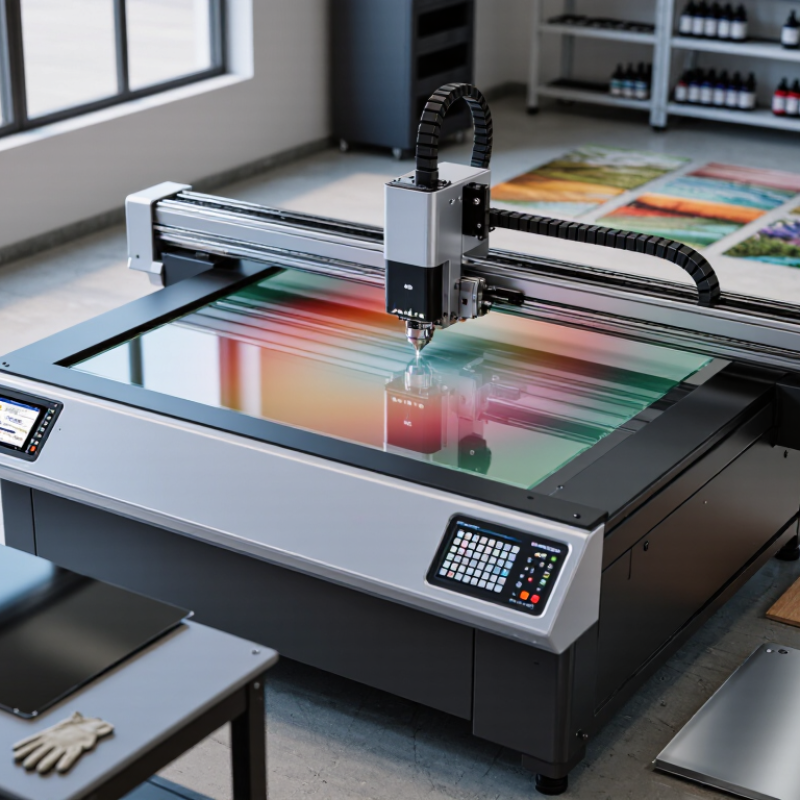
What a UV Flatbed Printer Is and How It Works
A UV flatbed printer places rigid materials on a level vacuum table. Unlike roll printers, it does not pull flexible media through rollers. The table supports wood, acrylic, glass, metal sheets, ceramic tiles, and selected plastics. A moving printhead deposits tiny ink droplets across the surface. UV LED lamps cure the ink immediately after printing. The finish can appear sharp, raised, glossy, or textured. It feels almost immediate.
The printer usually uses color channels such as cyan, magenta, yellow, and black. White ink helps create bright images on dark or transparent materials. Some systems add clear ink for gloss effects or light texture. A RIP software controls ink volume, curing strength, and image placement. In practical production, surface preparation matters as much as printer quality. Dust, oil, or uneven boards can cause weak adhesion and visible defects. I have found that fast curing does not fix poor file preparation. It only makes mistakes permanent.
Tips: Clean every sheet before loading it. Test adhesion on a small area first. Keep the material flat and stable. Check the vacuum level before printing. Use a color profile suited to the material, not a random default. White ink may require regular circulation and careful maintenance. Operators sometimes rush this step, and the nozzles suffer. Leave space around tall objects, because the printhead needs safe movement. Review the first print under normal lighting, not only on a bright screen.
Key Factors for Evaluating UV Flatbed Printers in 2026
What Is the Best UV Flatbed Printer in 2026?
The best UV flatbed printer is not always the fastest model. Evaluate total output quality, uptime, operating cost, and operator control. According to Grand View Research, the global digital printing market was valued at about USD 36.8 billion in 2022. Its projected growth shows stronger demand for flexible, short-run production. That demand makes reliability more important than impressive brochure speed.
Check the printhead configuration, droplet control, curing consistency, and maximum media thickness. Ask for samples on acrylic, glass, wood, metal, and textured boards. A sharp image on coated material proves little. Smithers reports continued growth in industrial digital printing, driven by customization and shorter production runs. Therefore, inspect registration accuracy during repeated jobs, not only during a showroom demonstration. Energy use also matters. Measure curing power, standby consumption, ink waste, and maintenance time. A cheaper machine can become expensive after months of cleaning and downtime. I would not trust one test sheet.
Tips: Request a three-hour production trial with your own files and materials. Record setup time, cleaning cycles, rejected sheets, and usable output per hour. Compare annual service costs, training, software updates, and spare-part access. Ask whether printed samples remain stable after rubbing, sunlight exposure, and temperature changes. Independent testing is valuable, but its conditions may not match your workshop. Leave room for doubt.
What Is the Best UV Flatbed Printer in 2026?
Key factors for evaluating UV flatbed printers in 2026
This suggested procurement model assigns the greatest weight to print quality, production throughput, and material compatibility. Buyers should adjust the weighting according to their application, substrate mix, production volume, and total cost of ownership.
Types of UV Flatbed Printers and Their Typical Uses
What Is the Best UV Flatbed Printer in 2026?
The best UV flatbed printer depends on the material, workload, and required finish. A compact desktop model suits short runs of signs, gifts, and sample boards. Its smaller bed saves space, but thick materials may not fit. Industrial flatbed printers handle large sheets of acrylic, foam board, wood, glass, and coated metal. They are built for steady production and more consistent registration. Hybrid models combine a flatbed table with roll printing. This makes them useful for rigid panels, banners, labels, and flexible displays. However, changing between materials can slow the workflow.
Typical uses vary by printer type. Small businesses often produce personalized décor, menu boards, packaging prototypes, and interior graphics. Sign shops may print directly onto aluminum composite panels or textured wood. Retail teams can create short-run displays without ordering large quantities. UV curing gives sharp details almost immediately, which helps reduce waiting time. Still, glossy surfaces can expose dust, fingerprints, and weak adhesion. I once assumed higher resolution always meant better results. In practice, surface preparation often mattered more.
Tips: Test every new material before production. Check ink adhesion, color consistency, and surface scratches. Use a vacuum table for thin sheets, and measure thickness carefully. White ink can improve dark substrates, but it may need regular maintenance. Choose a printer with accessible service areas, clear calibration controls, and documented operating guidance. The fastest machine is not always the most reliable choice.
Leading UV Flatbed Printer Models to Compare in 2026
Comparing leading UV flatbed printer models in 2026 requires more than checking maximum speed. A reliable evaluation starts with table size, print resolution, ink configuration, and curing consistency. In daily production, these details affect edges, gradients, and reprints.
Entry-level models suit sign shops with moderate workloads and smaller boards. Mid-range models often provide wider beds, stronger vacuum systems, and faster white-ink circulation. High-production models may add multiple printheads, automated media loading, and dual-zone tables. Look closely at the usable print area. A large frame is not helpful if the vacuum cannot hold thin acrylic flat.
Material flexibility matters too. Test rigid plastics, coated wood, glass, metal sheets, and textured panels before purchasing. Ask for real sample files, not only showroom images. Inspect small text, solid white areas, dark gradients, and raised varnish effects. Maintenance access is equally important. Easy nozzle checks and simple cleaning routines can save hours each week.
Speed claims need careful interpretation. Manufacturers may measure draft mode, not finished-quality output. I have seen slower machines produce more saleable sheets because they require fewer corrections. That is not always convenient. Service response, operator training, spare-part availability, and software stability should be compared beside technical specifications. A model with slightly lower output may prove more dependable for a small team, although this depends on workload, material mix, and local support.
How to Choose a Printer for Your Materials and Production Needs
What Is the Best UV Flatbed Printer in 2026? The answer depends on your materials, workflow, and production targets. A machine suited to rigid signage may perform poorly on textured wood or thin acrylic. Before comparing specifications, list your real products. Include board thickness, surface texture, maximum sheet size, and daily volume. Measure twice.
Industry data supports this material-focused approach. Smithers’ The Future of Digital Print to 2028 projects digital packaging print to grow from about $22 billion in 2022 to $36 billion by 2028. This growth favors flexible, short-run production, but speed alone should not decide your purchase. If you print corrugated board, check vacuum control and media handling. For glass or coated metal, test ink adhesion, curing, and scratch resistance. Ask for printed samples using your own substrates.
MarketsandMarkets forecasts the UV LED market to grow at over 10% annually through 2030, reflecting wider adoption of energy-efficient curing systems. Still, a faster lamp does not guarantee better output. Inspect banding under angled light. Check white ink opacity on dark acrylic. Review color consistency across a full production day. I would also calculate setup time, ink usage, maintenance, and rejected sheets. No brochure shows every warped board. A small test can expose an expensive mistake. Choose the printer that handles your hardest material reliably, not the one with the longest feature list.